Introduction
YouTube Earnings per 1000 Views: YouTube RPM Explained (2026)How much does YouTube pay for 1,000 views? This is one of the most common questions among new and experienced YouTube creators. Whether you upload educational videos, gaming content, technology reviews, entertainment videos, or YouTube Sho...
Full Details
YouTube Earnings per 1000 Views: YouTube RPM Explained (2026)
How much does YouTube pay for 1,000 views? This is one of the most common questions among new and experienced YouTube creators. Whether you upload educational videos, gaming content, technology reviews, entertainment videos, or YouTube Shorts, understanding your earnings per 1,000 views can help you estimate your channel's potential revenue.
YouTube does not pay a fixed amount for every 1,000 views. Your earnings depend on several factors, including your audience's location, content category, video format, advertiser demand, watch time, and the number of views that generate revenue.
The most important metric for understanding your actual YouTube earnings is called RPM (Revenue Per Mille).
In this complete guide, you will learn what YouTube RPM means, how much YouTube pays per 1,000 views, the difference between RPM and CPM, how country and niche affect earnings, and how to calculate your estimated YouTube revenue.
You can also use our YouTube Money Calculator to estimate potential channel earnings based on views and your selected RPM.
1. What Is YouTube RPM?
RPM stands for Revenue Per Mille, where Mille means one thousand.
YouTube RPM represents how much money a creator earns for every 1,000 video views after YouTube's revenue share.
RPM is a creator-focused metric that helps you understand how much revenue your channel generates from its views.
RPM can include several revenue sources, such as:
Advertising revenue
YouTube Premium revenue
Channel memberships
Super Chat
Super Stickers
For example, suppose your YouTube channel receives 100,000 views and generates $300 in estimated revenue.
Your RPM would be:
RPM = ($300 ÷ 100,000) × 1,000
Your YouTube RPM = $3.00
This means your channel generates an average of $3 for every 1,000 views.
Remember that RPM is an average. It does not mean every 1,000 views will generate exactly $3.
2. How Much Does YouTube Pay per 1,000 Views?
YouTube does not have a universal payment rate for 1,000 views. Different channels can earn very different amounts even when they receive the same number of views.
For illustration, here are some hypothetical RPM scenarios for regular YouTube videos:
| RPM | Earnings per 1,000 Views |
|---|---|
| $0.50 | $0.50 |
| $1.00 | $1.00 |
| $2.00 | $2.00 |
| $3.00 | $3.00 |
| $5.00 | $5.00 |
| $10.00 | $10.00 |
| $15.00 | $15.00 |
These are calculation examples, not guaranteed YouTube rates or industry averages.
Your actual earnings depend on your channel's RPM, audience, monetized views, and revenue sources.
YouTube Earnings for Different View Counts
The following table shows how much a channel could earn at different RPM levels.
| Views | $1 RPM | $3 RPM | $5 RPM |
|---|---|---|---|
| 1,000 | $1 | $3 | $5 |
| 5,000 | $5 | $15 | $25 |
| 10,000 | $10 | $30 | $50 |
| 50,000 | $50 | $150 | $250 |
| 100,000 | $100 | $300 | $500 |
| 500,000 | $500 | $1,500 | $2,500 |
| 1 Million | $1,000 | $3,000 | $5,000 |
| 5 Million | $5,000 | $15,000 | $25,000 |
| 10 Million | $10,000 | $30,000 | $50,000 |
These calculations assume that the selected RPM remains constant across all views.
3. What Is the Difference Between YouTube RPM and CPM?
RPM and CPM are two important terms in YouTube monetization, but they measure different things.
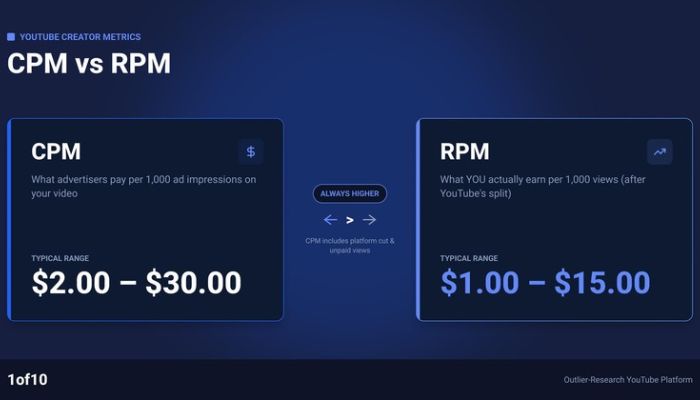
RPM (Revenue Per Mille) measures the creator's estimated revenue per 1,000 views after YouTube's revenue share.
CPM (Cost Per Mille) measures how much advertisers pay per 1,000 ad impressions before YouTube's revenue share.
Here is a comparison:
| Feature | RPM | CPM |
|---|---|---|
| Full Form | Revenue Per Mille | Cost Per Mille |
| Focus | Creator earnings | Advertiser cost |
| Revenue Share | After YouTube's share | Before YouTube's share |
| Views | Includes non-monetized views | Based on ad impressions |
| Purpose | Understand channel revenue | Understand advertising costs |
Example of RPM vs CPM
Suppose an advertiser spends $10 for every 1,000 ad impressions.
This does not mean the creator receives $10.
The creator's actual earnings depend on YouTube's revenue share, the number of monetized views, and other revenue sources.
That is why RPM is generally more useful than CPM when estimating how much money a YouTube channel actually earns.
4. How to Calculate YouTube Earnings per 1,000 Views
Calculating YouTube earnings is simple when you know your estimated RPM.
Use this formula:
YouTube Earnings = (Total Views ÷ 1,000) × RPM
For example:
Total Views: 500,000
Estimated RPM: $4
Total Earnings: $2,000
Calculation:
(500,000 ÷ 1,000) × $4 = $2,000
Calculate Your YouTube Earnings Online
You do not need to calculate everything manually.
Use our free YouTube Money Calculator to estimate potential earnings based on your views and selected RPM.
You can use the calculator to explore different RPM scenarios and understand how your estimated revenue changes as your views increase.
Try the YouTube Money Calculator: https://yttoolshub.net/tools/youtube-money-calculator
5. YouTube Earnings per 1,000 Views by Country
Audience location is one of the important factors affecting YouTube advertising revenue.
Advertisers in different countries may have different advertising budgets, audience targeting requirements, competition, and demand.
For example, a channel with viewers primarily from the United States may have a different RPM from a channel with viewers primarily from Bangladesh.
Countries That Creators Often Compare
United States (USA)
The United States has a large advertising market. Advertiser demand, content category, and audience characteristics can influence the RPM of channels with US viewers.
United Kingdom (UK)
The UK is another important English-language advertising market. Earnings vary depending on the audience and the type of content.
Canada
Canadian viewers can contribute to advertising revenue, but actual earnings depend on advertiser demand and channel performance.
Australia
Australia is another market that creators often target when building English-language content.
Worldwide Audience
A channel with viewers from multiple countries will have a blended RPM based on its overall audience and revenue mix.
Does Audience Location Affect YouTube RPM?
Yes. Viewer geography can influence the availability and value of advertisements.
However, there is no guaranteed RPM for any country.
Two channels with the same number of US views can still have different RPMs because of their niches, audience demographics, video formats, seasonality, and monetization performance.
To understand your own country-wise earnings, check the Geography report in YouTube Studio.
6. YouTube RPM by Niche
Your content category can also influence your YouTube earnings.
Some topics attract advertisers who are willing to spend more to reach specific audiences. Other topics may have lower advertiser demand.
Here are some popular content categories that creators often compare:
Finance and Investing
Finance-related videos may attract advertisers in banking, financial services, insurance, and investing.
Technology
Technology channels can cover smartphones, laptops, software, gadgets, and product reviews.
Education
Educational channels publish tutorials, lessons, study guides, and informative videos.
Gaming
Gaming channels publish gameplay, reviews, walkthroughs, livestreams, and gaming tutorials.
Entertainment
Entertainment content includes reactions, comedy, storytelling, and general entertainment videos.
Travel
Travel creators publish destination guides, hotel reviews, travel tips, and tourism content.
Lifestyle
Lifestyle channels cover daily routines, personal experiences, fashion, beauty, and other everyday topics.
Important: There is no official fixed RPM for any niche. Any niche-based RPM chart should be treated as an estimate rather than a guaranteed earning rate.
Your actual RPM should be taken from your own YouTube Analytics.
7. YouTube Shorts Earnings per 1,000 Views
YouTube Shorts use a different monetization system from regular long-form videos.
Shorts advertising revenue is collected from ads displayed between videos in the Shorts Feed. YouTube allocates revenue through a Creator Pool based on eligible engaged views and other applicable factors.
Eligible monetizing creators receive 45% of their allocated Shorts revenue.
Shorts RPM is calculated using engaged views rather than the standard long-form view basis.
Shorts vs Long-Form Earnings
| Feature | YouTube Shorts | Long-Form Videos |
|---|---|---|
| Format | Short vertical videos | Regular videos |
| Ad Placement | Shorts Feed | Watch Page |
| Revenue Model | Creator Pool allocation | Watch Page ad revenue share |
| Creator Revenue Share | 45% of allocated revenue | 55% of net Watch Page ad revenue |
| RPM Measurement | Per 1,000 engaged views | Per 1,000 views |
Shorts and long-form RPM should not be compared as if they use exactly the same calculation method.
How to Earn More from YouTube Shorts
Create original and engaging short videos.
Focus on a specific audience.
Publish consistently.
Improve viewer retention.
Follow YouTube monetization policies.
Experiment with different content topics.
High view counts alone do not guarantee high Shorts revenue.
8. YouTube Long-Form Video Earnings
Long-form videos are regular YouTube videos watched on the Watch Page.
Eligible monetized videos can generate revenue through different advertising formats, including pre-roll, post-roll, skippable, and non-skippable ads where available.
Videos that are eight minutes or longer can also be eligible for mid-roll ads, subject to YouTube's rules and ad placement suitability.
Why Can Long Videos Earn More?
Longer videos may offer additional opportunities for advertising.
However, video length alone does not guarantee higher earnings.
Other factors include:
Viewer retention
Watch time
Ad availability
Audience location
Advertiser demand
Content suitability
Number of monetized playbacks
A useful long-form video should prioritize viewer experience rather than simply adding extra minutes.
9. What Factors Affect YouTube RPM?
Several factors can influence how much a YouTube channel earns per 1,000 views.
1. Audience Location
Viewers from different countries may generate different advertising revenue because of variations in advertiser demand.
2. Content Category
Finance, technology, education, entertainment, and gaming can attract different advertisers.
3. Video Length
Longer videos may provide additional ad opportunities, including mid-roll ads when eligible.
4. Viewer Engagement
Watch time and audience retention can influence the opportunities to show ads and the overall performance of your videos.
5. Advertiser Demand
Advertising budgets change throughout the year. Competition among advertisers can affect CPM and RPM.
6. Seasonality
Advertising demand can increase or decrease during different periods.
For example, some advertisers increase their budgets during major shopping seasons and holidays.
7. Monetized Views
Not every YouTube view includes an advertisement.
Some viewers may not receive an ad because of their location, Premium subscription, advertiser targeting, or ad availability.
8. Content Monetization Eligibility
Videos that are not suitable for advertisers or do not meet monetization requirements may generate less advertising revenue.
9. YouTube Premium Viewers
Eligible creators can also receive a share of YouTube Premium subscription revenue based on how Premium members watch their content.
10. How to Increase Your YouTube RPM
If you want to improve your YouTube earnings, focus on increasing the overall value of your content and audience.
Here are some practical strategies.
Create Valuable Content
Publish useful videos that solve real problems. Tutorials, educational videos, product comparisons, and detailed explanations can attract audiences with specific interests.
Target the Right Audience
Understand who watches your videos and which countries generate the most engagement and revenue.
Improve Audience Retention
Create engaging introductions, organize your content clearly, and avoid unnecessary sections.
Use Mid-Roll Ads Where Eligible
If your videos are eight minutes or longer, you may be able to use mid-roll ads.
Place ad breaks at natural transitions to avoid unnecessarily interrupting the viewing experience.
Enable Available Monetization Features
Depending on eligibility, you may be able to earn through:
Watch Page ads
Shorts Feed ads
YouTube Premium
Channel memberships
Super Chat
Super Stickers
Super Thanks
Review Your YouTube Analytics
Check RPM, CPM, estimated revenue, audience geography, and revenue sources regularly.
Identify which videos and audiences contribute most to your earnings.
Focus on Original Content
Publish original content that follows YouTube's monetization policies. Reused, repetitive, or otherwise ineligible content can affect monetization.
11. How to Check Your YouTube RPM in YouTube Studio
You can find your actual RPM directly inside YouTube Studio.
Follow these steps:
Open YouTube Studio.
Sign in to your monetized YouTube channel.
Select Analytics from the left menu.
Open the Revenue tab.
Find the RPM metric.
Select your preferred date range.
Review your estimated revenue and RPM.
You can also explore individual video revenue reports to understand which videos generate more earnings.
How to Check RPM for Individual Videos
Open YouTube Studio.
Go to Content.
Select a video.
Open Analytics.
Select the Revenue tab.
Review the available revenue metrics.
This helps you compare the performance of different videos on your channel.
12. YouTube Earnings Examples
Let's explore some hypothetical examples to understand how different RPM values affect total earnings.
Example 1: 10,000 Views
If your channel receives 10,000 views and has a $2 RPM:
(10,000 ÷ 1,000) × $2 = $20
Estimated earnings: $20.
Example 2: 100,000 Views
If your channel receives 100,000 views and has a $3 RPM:
(100,000 ÷ 1,000) × $3 = $300
Estimated earnings: $300.
Example 3: 1 Million Views
If your channel receives 1 million views and has a $5 RPM:
(1,000,000 ÷ 1,000) × $5 = $5,000
Estimated earnings: $5,000.
Example 4: 5 Million Views
If your channel receives 5 million views and has a $4 RPM:
(5,000,000 ÷ 1,000) × $4 = $20,000
Estimated earnings: $20,000.
These examples assume a constant RPM and are not guaranteed payouts.
13. Frequently Asked Questions (FAQ)
How much does YouTube pay for 1,000 views?
YouTube does not pay a fixed amount for every 1,000 views. Your earnings depend on your RPM, audience location, niche, video format, and monetization performance.
How much is 1,000 YouTube views worth?
The value of 1,000 views depends on your channel's RPM. For example, at a $3 RPM, 1,000 views would generate approximately $3 in estimated revenue.
What is a good YouTube RPM?
A good RPM depends on your content category, audience, and revenue goals. Compare your current RPM with your own historical performance rather than relying on a universal benchmark.
Is RPM the same as CPM?
No. RPM measures creator revenue after YouTube's revenue share, while CPM measures advertiser spending per 1,000 ad impressions before YouTube's revenue share.
Why is my YouTube RPM so low?
Your RPM may be low because of audience geography, low advertiser demand, a high proportion of non-monetized views, content category, or changes in revenue sources.
Do YouTube Shorts pay more than regular videos?
Shorts and regular videos use different monetization systems. Their RPMs are calculated differently, and long-form videos often have different advertising opportunities. Actual earnings depend on the channel.
Does YouTube pay more for US views?
US viewers may generate higher advertising revenue in some niches because of advertiser demand. However, there is no guaranteed US RPM.
Can I earn money from YouTube without 1,000 subscribers?
YouTube offers some earlier YPP access features in eligible countries, but full advertising revenue sharing generally requires meeting the applicable higher eligibility requirements. Check the current requirements for your country.
How can I calculate YouTube earnings?
Use this formula:
Earnings = (Total Views ÷ 1,000) × RPM.
You can also use our free YouTube Money Calculator to estimate your potential revenue.
Does YouTube RPM include sponsorships?
Standard YouTube Analytics RPM does not include most external brand deals, sponsorships, or merchandise sales. These can generate additional income outside the RPM metric.
Can YouTube RPM change every month?
Yes. RPM can change because of seasonal advertising demand, audience location, monetized views, video performance, and other revenue sources.
Where can I find my actual YouTube RPM?
You can find your actual RPM in YouTube Studio under Analytics → Revenue.
Conclusion
Understanding YouTube earnings per 1,000 views is essential for creators who want to build a sustainable YouTube channel.
RPM is one of the most useful metrics for estimating how much revenue your channel generates from its views. However, your earnings depend on multiple factors, including audience location, content category, video format, advertiser demand, and monetization performance.
Instead of focusing only on total views, monitor your RPM and estimated revenue in YouTube Studio.
If you want to estimate your potential YouTube earnings, try our free YouTube Money Calculator.
Enter your estimated views, adjust the RPM, and explore how much your YouTube channel could potentially earn.
No comments yet. Be the first to leave a thought!